Monday, January 19, 2015

The LOLLIPOP Update

Android Lollipop is a HUGE update that sees Google taking its already mature platform several steps further. Google has tightened up nearly every element of its mobile platform, refining the look and feel of Android across the board, as well as touching up back-end tools and protocols to make the platform even more efficient. The first wave of updates is now in full swing with Motorola and Samsung confirming release schedules for all of hardware.

Design: The Material ART
 The big news regarding Android Lollipop is the fresh look, coined "Material" by Google. There are some similarities between Material and the look of "stock" Android KitKat, the designers at Google have clearly forged a new path here, in purely aesthetic terms. The flatness seen in KitKat is still present and correct, but it comes with a twist: realism. Animation is going to play a big part in the new design, and Android Lollipop will adopt real-time shadows to give its interface more depth and make it look a little more dynamic. The shadows are there because Android Lollipop will make much more use of layers in the UI, allowing developers to do all kinds of visual customization within their apps. The famous Android "soft" buttons have been given a face lift, and look even more stylish than before. Google is embellishing Lollipop with new visual tricks to make things even more alluring. From what we've seen, it strikes us as massive improvement over the often flat and uninspiring Android 4.4.
 
Security:
 Google has made massive strides with Android when it comes to overall security, coming up with innovations such as pattern unlocks and facial recognition. Android Lollipop's big advance is going to be about making security more convenient, and it will do this using two methods: Android Wear and your current location. In the first case, you can use your shiny new Android smartwatch as an authentication tool to automatically bypass your phone's passcode when it detects the watch nearby. In the second example, you can designate safe zones – your home, for example – where your phone will switch off your lock code. While both of these features could potentially create a security risk, if someone steals your phone and your smartwatch, they have access to all of your personal data, for instance, but they will overcome the irksome issue of having to continually unlock your device every few minutes.

Battery Life: Project VOLTA
 Project Butter was Google's way of making Android feel smoother and slicker, and now the company has revealed Project Volta – a system which will provide developers with a better means of determining what elements of their apps are draining battery at an unnecessary rate. Because Volta will open up the battery stats to developers, they can tinker with their code to make apps more efficient and spot potential problem areas. Android Lollipop will also take a leaf out of HTC and Samsung's books by coming with a battery saving mode by default. This will help users get as much mileage out of each charge as possible by throttling certain functions when juice is low. Such improvements will ensure that Android L is leaps and bounds ahead of KitKat, which only offers basic stats on what process is gobbling up the most power.

Miscellaneous: Better Connections and Stronger APIs
Notifications have been Android's strong suit since day one, and Google is making them even better in Android Lollipop. Now they are being integrated into the lock screen – something Google previously experimented with when it developed lock screen widgets which allowed you to view emails and events without actually unlocking your phone. As well as making notifications the first thing you see when you pick up your handset, Google is working on making them smarter when the phone is in active use. For example, in KitKat a call would totally interrupt whatever activity you were involved in, be it reading a book, browsing your emails or playing a game. In Android Lollipop, events such as these will pop up at the top of the screen, a la Samsung’s Galaxy S5, meaning you can choose to jump to that event or ignore it with a quick tap without leaving your current task. Notifications are going to be smarter, more intuitive.

So did you get your LOLLIPOP ?


Sunday, January 18, 2015

SAMSUNG Z1 | First TIZEN Powered Phone in INDIA

Samsung Z1 smartphone in India has been launched with a price tag of INR 5,700 ($92). It is the company’s first Tizen OS-based smartphone in the country, and is available in White, Black, and Wine Red color options.

The Samsung Z1 is powered by a Spreadtrum SC7727S chipset containing 1.2 GHz dual-core processor and Mali 400 GPU. The smartphone sports a 4-inch WVGA display, and runs Tizen OS 2.3. The budget-minded Z1 comes with 768MB of RAM and 4GB of internal memory (expandable up to 64GB via microSD). It has a 3.1-megapixel rear camera and a VGA front-facing snaper, and packs in a 1500mAh battery. Other features include dual SIM support, as well as Bluetooth, Wi-Fi, GPS, and 3G connectivity.

On the software side, the smartphone features built-in AntiVirus protection, an Ultra Power Saving Mode to extend the battery life, and free access to Hungama music for three months, as well as premium content though Club Samsung. It also lets you send SOS alerts, something which can be done by pressing the power button four times. Reliance and Aircel users will also get 500MB of free 3G data per month for a period of 6 months with the device. Built on the lightweight Tizen platform, the Samsung Z1 delivers a faster boot time and quick access to apps, along with enhanced web performance to offer users faster page loading times with decreased data usage. The Samsung Z1 is equipped with long-lasting battery performance and also features ‘Ultra Power Saving Mode’ to ensure users can always stay connected, even at the minimal battery levels.

Looking at this phone will give you the feel of Galaxy Ace or Galaxy Star series. There’s nothing radically new about the design or the build though it does have metallic-finish on the side. It really doesn’t look so different from the countless Android phones that Samsung has offered in the past. Perhaps that is what Samsung was going for, but seriously we feel that the design doesn’t help the Z1 stand out.

The Tizen OS: As far as the Tizen OS is concerned, we couldn't help but notice the similarity to Android, at least where the look of the icons is concerned. There’s also a drop-down menu for notifications, Wi-fi, other settings. There’s also the Favourites app feature which will show you the 8 most-used apps in two rows. You can either stick to these or swipe further down to get to the other apps. There’s a Tizen app store and it’s not clear when or if Samsung will bring other apps stores to the OS. The smartphone will run Android apps thanks to integrated Android app support for Tizen OS. While Facebook, WhatsApp, Google haven’t created any apps for this OS, Samsung has created its own apps for these which are available in Tizen OS and thus users can access them. As far as the overall OS is concerned, it felt fairly fast and smooth on the Z1.

Conclusion: Will Z1 be a game changer for Samsung? It’s hard to say yes, because you can’t help but compare it to what is available in the market. Some Android devices which are in the same price range, offer better specs. For instance, Redmi 1S is priced only Rs 5,999 (Rs 299 more than the Z1) and has a better camera (8 megapixels); the Asus Zenfone 4 has more storage space 8GB, 5 megapixel camera and is priced at Rs 5,299. So yes, there are cheaper, more feature-rich alternatives to the Z1 which might appeal too many. Z1 and Tizen is Samsung’s alternative to the dominance of Google. And yet you feel that by keeping this as a budget phone with bare minimum specs, Samsung hasn’t really given the Z1 the backing it needs.  There’s no doubt that it’s a pretty zippy OS given how smoothly it functioned for us in the demo zone, but the lack of apps and features on the phone don’t really do it much justice.


Saturday, January 17, 2015

TIZEN | The New Software Platform

Tizen is an open source, standards-based software platform for multiple device categories, including smartphones, tablets, netbooks, in-vehicle infotainment devices, smart TVs, and more. Tizen offers an innovative operating system, applications, and a user experience that consumers can take from device to device. It’s based on Linux kernel and WebKit runtime. This means that users can obtain the source code that Tizen is based on, allowing smartphone owners to tinker with and alter a device’s software. Android, Firefox OS and Ubuntu are also open-source, unlike Apple’s closed iOS mobile operating system.

The Tizen OS is a project within the Linux Foundation and is overseen by a Technical Steering Group that consists of Intel and Samsung. Samsung smartphones come with a heavily skinned version of Android known as TouchWiz, which puts Samsung’s own spin on the Android interface and includes its own Samsung Apps store.

Tizen encourages its developers to write apps in HTML5. Other operating systems such as Android and iOS use Java and Objective-C as their primary coding languages. HTML5 essentially enables a smoother Web browsing experience for mobile devices, such as the ability to display embedded videos or play music without an additional plugins and save data offline.
 The Tizen operating system is built to interact with certain touch gestures that consist of taps, swipes and flicks among other actions. As is the case with most touch screen devices, tapping an item will select it and long-pressing will launch an app-specific option menu. Pinch to zoom, dragging and dropping icons, and flicking to quick scroll are all supported within the Tizen UI.
Tizen may be touted as Samsung’s new Android alternative, but the truth is the software isn’t made just for mobile devices. Tizen is also used in tablets and netbooks as well as smartphones, but it’s also slated to Smart TVs. This isn't very surprising considering Samsung is a major player in pioneering the Smart TV category.

Samsung has already introduced a low-cost smartphone using Tizen in India, the Samsung Z1 On January 14, 2015.


Friday, January 16, 2015

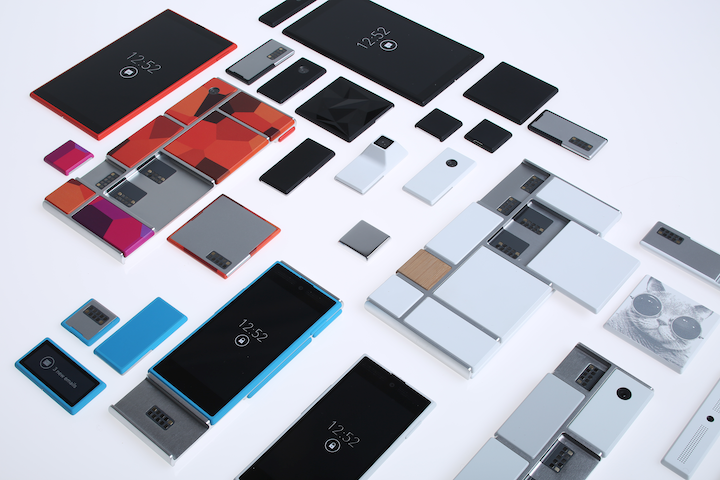
ARA SMARTPHONES | The Modular Mobile

Project Ara is a development setup to create a modular hardware for mobile apps in the pace and level of innovation around smartphones, with the goal of delivering the mobile internet to the next 5 billion people.  Project Ara aims to enable users to create a modular smartphone that is precisely tailored to their functional and aesthetic preferences.

The user can populate the structural frame with “modules,” the building blocks that make up the vast majority of the phone’s functionality and features. The modules can be easily and safely inserted and removed at any time, even while the device is powered on. Customers will be able to buy a complete Ara phone, configure one from scratch, or buy additional modules through the Ara Module Marketplace. Project Ara lives in Google’s Advanced Technology and Projects (ATAP) group.

 Project Ara devices will run the Android operating system. With a modular platform, you can pick the camera you want for your phone rather than picking your phone for the camera. You could have a sensor you want in your mobile not the one you get when you buy a mobile. . You could have a battery that lasts for days. A really awesome speaker. A gamer phone. 

 You can upgrade different parts of your phone when you need too. Replace a broken display. Save up for a high-end camera. Share a module with your family, or swap one with your friends. Update not just the software of the phone but also the hardware by replacing the modules in the phone. Not much has been said or has been decided about the frame building or the exoskeleton designing of the phone, but electronic 3D printing seems to be a viable method to develop the modules for this approach. Google aims to fulfill the needs of 5 Billion people for the usage of mobile internet and at the same time introducing new angle in the total cost of ownership and the level of customization and personalized mobiles which shall be delivered to the users.


Tuesday, January 13, 2015

Intel's Compute Stick !!!

Got an HDMI port handy?  Sure, you could plug in a Chromecast to get your Netflix fix. Or you could pay $150 to get a full Windows 8.1 PC in the same form factor. This is the Intel Compute Stick, a humble HDMI dongle that houses a full desktop computer experience. It's not a particularly powerful one—you get a quad-core 1.33GHz Intel Atom processor, 2GB of RAM, and 32GB of solid state storage—but it does have Wi-Fi, Bluetooth, and both a full-size USB port and a micro-SD card slot for expandability.

More likely, it'll find a home in small businesses, schools, and the like who want to roll out super cheap computers to their employees, since all you need is this stick, an HDMI monitor and a couple peripherals to get things cranking. The Compute Stick takes the guts of a fully-functional Windows 8.1 or Ubuntu Linux computer and puts it into something the size of a Chromecast. The full Windows 8.1 version of the Compute Stick will sell for just $149. The Compute Stick uses Intel's Bay Trail Atom Z3735F quad-core processor and includes Bluetooth 4.0, 2.4Ghz 802.11n wireless and a single USB port. It also includes a micro-SD expansion slot for more storage.
 
The Windows 8.1 version of the Compute Stick has 2GB of RAM and 32GB of flash storage built-in. As we said, it's just $149, a steal when you consider that a full version of Windows is included. A Linux version of the Compute Stick is also available for $89. It comes with 8GB of storage and 1GB of RAM.

The current lot of Android Stick PCs are good for gaming and multimedia, but Android itself can’t compare to Windows when it comes to getting work done in a desktop environment. 
The Compute Stick is essentially a complete PC, but in the compact form factor of a slightly large pen drive. It connects to a TV via HDMI, but also has to be powered with a micro-USB cord. Here’s a quick look at the important specs:

·         1.33GHz quad-core Intel Atom Z3735F processor
·         2GB DDR3 RAM
·         32GB internal storage
·         Micro-SD slot (up to 128GB)
·         Wi-Fi 802.11 b/g/n
·         Bluetooth 4.0
·         Full-size USB port
·         HDMI 1.4
·         Windows 8.1 Bing


Intel wants to help you turn any TV into a Windows PC, for the low cost of $149. All it takes is a little stick. As someone who likes to travel but loathes toting a laptop around, keeping something like this with a Bluetooth keyboard and mouse in my luggage would be a compact way to get a more robust computing experience than my iPad is going to offer, without tipping the scales or putting much of a dent in wallet.  

Sunday, January 11, 2015

Nikon D5500 | The SLR with a Touch

More or less megapixels define the quality of photo taken by SLR’s. The Nikon D5500, unveiled at CES 2015, proves that in spades. Even though the D5500 has 24.2 megapixels, the same number as its predecessor, the D5300, the D5500 nonetheless have a slew of new features - among them are integrated Wi-Fi and a touch-enabled screen. Add in a design update as well, and the D5500 earns an authoritative place in Nikon's lineup.

Nikon has redesigned the body to make it both smaller and lighter as compared with its predecessor, a critical maneuver in an age when the DSLR has to compete against the smaller, more nimble interchangeable lens cameras (ILCs). The D5500 measures 4.9 x 3.8 x 2.8 inches, smaller as compared with the D5300 and the D3300, two compact predecessors in Nikon's lineup. The body alone weighs 0.93 pound (420 grams).  Not to mention customers crave for devices which are light weight and highly functional.
Nikon describes the body as monocoque, French for structural skin made of one big piece. The materials are a carbon fiber composite and a magnesium alloy. The D5500 is due to ship in early in February in both black and red body colors, with a price of $899.95 for the body only, the various lenses which need to be added, depend from user to user.

For starters, prominently on the top of the body, behind where the pop-up flash, sits a stereo microphone. While Nikon doesn't indicate there's any enhancement built into the microphone, its presence is a good step forward for those who like to capture video with their SLR, but aren't ready to invest in external microphone (though, there's still a jack on the side to add that). The next thing that's obvious looking at the top of the camera is that the D5500 has had a redesign of its buttons and dials. The redesign makes most functions more efficient, by moving the fixed scene modes and creative functions off the Mode dial and into the touch-enabled rear menu (more on that in a moment). Even if it might mean an extra tap or so in the interface, the use of touch still makes everything seem more efficient. Furthermore, the dial is now left for the primary shooting modes of an SLR, including Program, Manual, Shutter priority, and Aperture. And to the right of the dial sits a smooth lever to flip down to activate the Live View shooting mode.

The Info button has been re-situated to a more convenient spot. There are other, more seemingly minor changes to the design of the D5500, too. For example, the doors covering the side ports (including HDMI and USB) feel a bit more secure than in the past. And the battery pack has been rotated by 90 degrees and placed into the grip to conserve on space and help shave off those fractions of an inch.
As for the battery, life has been extended by almost 37%, according to Nikon. That translates to a CIPA rating of 820 shots. The hand grip is now deeper, which greatly improves the ergonomics of the camera. I found the deeper grip comfortable to use, and it made the D5500 easier to grab and hold than with previous models.

All in all, this is good start for SLR line up for New Year at Nikon. At a slightly higher price company is adding myriad of features to brag about, not to mention usability and UI both have improved in the device. If looking for an advanced SLR, this might be the pick which you should look at.

Saturday, January 10, 2015

WINDOWS 10 | A Technical Preview

You are not the only one surprised with the name Windows 10. Everyone thought Windows 9 would be the next Windows because the existing one is Windows 8.1, which is an update to Windows 8. No one is sure why Microsoft decided to skip 9 in the naming scheme. May be someone within Microsoft liked the joke "7 8 9 (seven ate nine)" and thought it was a great idea to move to the number 10. Anyways, Windows 10 technical preview is out and company wishes to launch the full-fledged OS sometime later in 2015.

With Windows 10 Microsoft is again focusing on traditional computer users and enterprise customers who love Windows 7 and Windows XP. Windows 10 is closer to Windows 7 than Windows 8. Microsoft said that Windows 10 would be available in the later part of 2015. Price is not yet available. The actual release of Windows 10 is months away but the company is releasing technical preview of the Windows 10 on Wednesday night. It expects that consumers will use this preview version and share feedback, which will be used to polish the software.
 
To that end, Windows 10 will run on more types of devices than ever before, and Microsoft will bring forth a single application platform, complete with one integrated Store, to deliver Windows experiences across devices. The traditional Windows 7 Snap View works in classic and universal apps on Windows 10.
Microsoft also wanted to make its OS more novice-friendly to help them multitask better on the platform. A button called "task view" is now present on the task bar, and launching task view will pull up all the apps users have running. Multiple desktops live along the bottom of the screen, and users can jump from desktop to desktop while keeping all their apps running.

A new Snap Assist UI lets users grab apps from various desktops, pulling them onto their screen in one full-screen view. You can have Bing search along the bottom, a Word doc on top, a PowerPoint to the side and your finder open below it. In a simple fix - one that should have been added long ago - users can now Crtl+V to paste a command prompt. Swiping to the left on a touch-enabled Windows 10 device will pull up task view, complete with larger buttons for a more finger-friendly experience. Swiping to the right pulls up the settings menu. 
A new design feature called Continuum lets the Windows 10 UI change depending on what device someone is using.

You can download Windows 10 Technical Preview version from the below link, and install it to your PC, generally if your PC runs Windows 7, it should run 10 as well, you would be needing a Microsoft account for this download, which can be acquired in a jiffy.


Windows 10 is all about balancing the demands of different users. It's not just business users with desktop PCs and keyboards, versus tablet users. Windows is for sensors and data centres and Windows Phone and Xbox One as well as tablets and laptops and desktop PCs and giant wall screens and all the devices in between (at least in Microsoft's ambitions). But what we're seeing in this first technical preview release is very much about balancing the heritage of two decades on Windows with the new world of touch, and with making IT teams comfortable with the BYOD and consumerisation features introduced in Windows 8 by giving them more security options and more management.